Soft skills blog articles

What I learned about being a trainer when I was a participant

I recently took part in a management training workshop. Aside from what I learned in the two days, it was very interesting to be a participant for once and not a trainer! As a participant, I was able to experience the training from a different perspective. Sometimes I felt a little bit nervous, especially during role plays. I hadn’t expected that. It certainly got me thinking about how I could transfer my experiences of being a participant into my training.

Encourage questions and check understanding

From time to time I didn’t understand the task that was set and I was always relieved when someone else asked the trainer to clarify what we had to do. It took a while for me to get comfortable enough to ask questions when I was confused. As a trainer, I can keep this in mind and make sure to check that everyone understands their task, or give people an extra minute to ask questions.

Power to the participants

One person in my group insisted on keeping his mobile phone turned on throughout the workshop and was constantly using it. The trainer asked a few times for him to stop using his phone but it wasn’t until I got annoyed and asked him, a fellow participant, did he understand that his behaviour was impacting other people. He then put his phone away. This was interesting for me as I would have normally thought the trainer carried the most authority in the room.

Encourage learning after the session

I was encouraged to read through my notes a few days after the workshop had finished. It only took a few minutes but it really helped me to remember what I had learned. That would be my top tip for learning. It sounds simple but actually finding the time to do it is another thing. In future I think I will make an Outlook appointment with myself, even if it is just for 15 minutes. I will encourage my participants to do the same.

Short breaks

It was tiring being a participant. What really worked for my concentration was to have multiple short breaks. Even a break of just a minute helped me gather my thoughts.

jonnyroundSend me your tips and ideas

What can the participants do to make the training a success? What does your trainer do to make the training interesting and useful for you? How important is training for you? And, do you also get nervous during role plays?



Leading interactive virtual meetings

What strategies can be used to make virtual meetings as effective and engaging as possible?

One of my clients recently asked me to listen in on a virtual meeting and give feedback to the chairperson of the meeting. This person wanted to make the daily meeting more interesting, interactive and motivating for the participants. Regularly scheduled meetings with topics which may or may not be completely relevant to all of the participants can lead to boredom. The temptation to multi-task and read emails, mute your microphone and tune out completely are high. Afterwards, we discussed the possibilities. Below is a summary of the ideas we came up with.

Know and use the virtual tools available to you

Do you know which tools are available to help make your meetings interactive? There are other tools you can use apart from just sharing your desktop. If you don’t know the system which your company uses very well, find out by doing some research or asking others. Or perhaps taking formal training is the most effective way to learn more about it.

Insist that participants dial in with their name or department

It is very helpful to have some way of identifying exactly who you are speaking to about a certain point. People often feel more inclined to answer or respond when they are addressed by name. Plus encouraging people is also more effective when you use their name!

VTchecklists

Free eBook download

Clearly identify (and stick to) the topics for the day

If possible, identify the people who need to be involved before beginning to speak. If this isn’t possible, clearly identify the topic and ask those people involved to give you some sign that they are listening.

State expectations and rules for participation in advance

Does this mean that you want people to orally respond when spoken to? Should they raise their hands using the virtual feature? Should they do nothing? Sometimes people do nothing simply because they don’t realize that you want them to respond at a given moment. Setting expectations beforehand can make participants more willing to engage.

If participants aren’t very motivated, ask yourself if the meetings are being held too frequently

Sometimes frequency leads to apathy. Are people starting to think that it isn’t important if they come or not or if they actively participate or not? Perhaps having fewer meetings might make them pay more attention and give the event a sense of importance again.

Consider having an assistant

This person could take the notes for you, prepare information, moderate chat sessions for big groups or help motivate people to respond by using pointed questions to individuals by using the chat feature. This will leave you free to concentrate on other matters.

Which strategies do you use?

There are certainly many other ideas which can be helpful for leading online meetings.  If you would like to share, feel free to use our comments area below.


Being effective in 2015 – 2 time management tips I know will make an impact

Anyone who knows me well will tell you that I’m not the most structured and organized of people. Like many managers I’ve got multiple roles – some I enjoy, others are a “necessity”. At the end of last year I was, quite frankly, ready for a break. Over the holidays I walked the dogs and reflected on the causes and possible solutions – and, like many of us, I’ve resolved to make a few changes this year. Drawing on the techniques we share in some of our seminars, these are two concrete time management tips I’m going to focus on going forward, and I know from past experience that they’ll make an impact. Maybe they can support you too.

Time management tip #1 – Talk with people about how they communicate and interact with me

Identifying why I seemed to be so busy was a first step. I then split these reasons into “time sins” , “time thieves” and “time wasters”. Time sins are things I do to myself, for example getting easily distracted, poor planning etc. Time thieves are things that others do which mean I’m not as effective as I could be, for example sending me too many emails when a phone call would be more effective, not preparing for a meeting which means everyone loses time, pushing problems up to me that they can and should be dealing with themselves. Time wasters are those things that just happen and are out of my immediate control e.g. delays caused by traffic, IT issues etc.

I’ll address time sins in the tip below – but in my case time thieves are also clearly a problem. So, going forward in 2015, I’ve resolved that, as and when time thieves reappear this year, I’m going to take (or make) the opportunity to talk with my colleagues. I’ll try to understand how they see things and why they are working like this, explain how I see things and then together agree to build new routines and habits. I know that time thieves won’t just disappear by themselves unless I talk with the “thief” directly. These conversations won’t always be easy but having them is important.

Time management tip #2 – Eat my frogs

Do you ever have that feeling that you just don’t know where to start? Everyone procrastinates at some time, and Brian Tracy’s “eat that frog” technique is an approach I’ve relied upon time and time again when things are getting a little too crazy at work and I don’t know where to start. For those of you who aren’t familiar with it, it goes something like this…

Your alarm goes off, and you roll over, turn it off and rub your eyes. Another day has begun and it’s time to get up and get ready to go to work. However before you get out of bed you sit up, reach across to your bedside table and pick up that big glass jar you keep next to you. You unscrew the lid, put your hand in and pull out … a frog. A living, croaking, slightly slippery frog. You then open your mouth, push the frog in, and start to chew it. Bones crunch, you resist the temptation to throw up, and then you swallow it. You then get up feeling relieved that this dreadful task is over. That was probably the worst thing that’ll happen to you all day .

Got your attention, right? Obviously this is a metaphor – eating frogs doesn’t actually help you become more effective. “Eating the frog” is a metaphor for doing the task that you’ve been avoiding, delaying or ignoring – and doing this task first thing! Most of us start work with the same comfortable routine. We get into the office, start up our computer, talk with a colleague, grab a coffee (and perhaps even read the news online) and then open and read our emails. Eating your frog means the very first thing you do when you get to work is that task you’ve been avoiding, delaying or ignoring. It could be a task that you’re nervous about tackling a task that you just don’t enjoy doing, or a task that you just don’t know where you should start. But before you open your emails, before you allow yourself the luxury of perusing the morning paper, before you even start chatting with a colleague – you do the thing you don’t want to do (for me this could typically be an administrative task). Once you’ve got your frog out of the way you’ll hopefully then spend the rest of the day being more effective, feeling more effective and focussing on other challenges.

These are 2 approaches I’m going to commit to. How about you? What tips and tricks do you have to share? How will you make sure that you are effective in 2015?

Helping out the non-native speakers in the room

Advice on how to improve your business communication skills is often directed at helping the non-native speakers communicate better, but what about the native speakers? What could/should they do to have a more successful outcome? Below are two considerations for native speakers preparing for meetings with mixed language ability colleagues. The examples shown below are from the observation of English native speakers, but the advice holds true for any meeting with different nationalities present.

Reformulate

It’s hard to cross-check yourself as a native speaker, especially when you are in full-flow and a strong, educated talker. It may be worth, however, trying to reword what you have just said- especially when you do catch yourself seeing some blank looks. The following expressions are taken from an actual meeting. Consider how difficult they might be to understand for a non-native English speaker. One way to evaluate this is by asking yourself: “Have I ever heard the other people in the room use this expression?” If the answer is “no”, then you should consider reformulating.

  • It’s all a bit clunky
  • We didn’t want to go there (not referring to travel, but a topic)
  • It didn’t go down very well
  • One-upmanship
  • That does seem a bit steep

Reduce excess words

English native speakers are especially good at using ‘softeners’. Softeners are words used to modify the potential force/impact of the message. For non-native speakers, the use of softeners can be ambiguous or confusing. Extracting the important information from someone’s speech is not always a simple task for a non-native English speaker. Take a look at the following example:

“We need some sort of decision probably by the end of the week”

This sentence could be interpreted as meaning, ‘I only need to think about part of the decision and I have no firm deadline to do so’. Non-native English speakers sometimes view softeners (the words in bold) as indicating that the real information they support is not that important. For a native English speaker, softeners are very hard to eradicate. On a simple level, however, you can see that softeners increase the number of words in a sentence and therefore might make comprehension of key facts trickier. This is not to say that softeners aren’t a useful tool, but factor in when it might pay to simply not use one.

More on meetings

Our blog features a number of posts on meetings.

Using the 3 dimensions of customer service in business communication

In a previous post, I talked about the 3 dimensions of customer service and how balancing the needs of your customer in each of the dimensions is a large step towards customer satisfaction. This post focuses on how you can use the 3 dimensions of customer service in your day-to-day business communication.

A quick reminder of the 3 dimensions

  • The business dimension – the reason for contacting you
  • The human dimension – the personal need of your customer (assurance, empathy, understanding)
  • The hidden dimension – everything that is going on behind the scenes

Read the full post

Focus on the person, not on the problem

Regardless of how the customer query ends up on your to-do list, and regardless of the type of query, the person most likely contacted you with a business problem. More often than not, you can tell how the customer is feeling by the tone of their voice, or the tone of their email. If you spot something in the tone of the conversation, you need to address it. You can’t ignore it.

Even if there’s nothing in the call or email that explicitly displays emotion, you should be able to address how you think the person is affected by the problem. Of course you need to solve the problem as soon as you can, but it shouldn’t be your first focus.

Here’s an example.


Customer query

Dear John,

When can we expect delivery of the replacement parts? Note that the order was placed almost 7 weeks ago.

Regards,

Bruno


John’s reply to the customer

Dear Bruno,

I understand that the delayed delivery will start causing problems for your end-client if the parts aren’t delivered soon (1). As you know, these parts are normally dispatched within 4 weeks of ordering (2).  I tracked your order. The problem lays in the manufacturing department. I have just spoken with a colleague there, and she said that the parts should be dispatched within 7 days. (3)

Leave it with me (4). I will follow up with my colleague on Monday and contact you to let you know if everything’s on schedule and when you can expect delivery of the parts (5).

My sincere apologies for the delay (6).

With regards,

John

What John did

  1. John starts the mail by saying that he understands the impact this has. (Human/business dimension)
  2. John reminds the customer how it “normally” works. (Business dimension)
  3. John tells the customer what he has done to find out about the order. (Hidden dimension)
  4. John takes responsibility for the query, assuring Bruno that someone is taking care of his problem. (Human dimension)
  5. John explains how he will follow up. (Business/hidden dimension)
  6. John apologizes for the service breakdown. (Human dimension)


Try it for yourself

Use the comments box at the bottom of this post to reply to this email, using all 3 dimensions:

I recently sent you a fax to cancel my contract with you. I have received no confirmation and my bank account shows that I’m still paying for your service. When I contacted your customer service department, they told me that I’d receive a confirmation within 6 weeks.

I’m still waiting.

Please let me know the status of my cancellation asap.

Thank you,

How do you measure the success of training?

More specifically, how do you measure the success of training when learners don’t have a test to pass? The goal of our training is for participants to be able to do their job better. How easily can that be measured, taking into account all of the other variables that can affect job performance?

When we look at the success of our on-the-job training, we use the Kirkpatrick Model as a guide. The Kirkpatrick model has four levels. When you measure each of the four levels, you have an overall impression of the success of the training. By looking at all four levels, it gives us the chance to make sure that what is learnt can really be implemented. Each level can individually help, but looking at all four levels together gives the real story. If you’re not familiar with the Kirkpatrick Model, here is a short summary:

Kirkpatrick’s four levels

Reaction

Are the learners/participants happy with the process?

Learning

Did the learners acquire the knowledge, skills or attitude that they were meant to learn?

Behavior

Have the learners changed the way they do something when they got back to the job?

Results

Has the training helped to achieve certain results?

An example of the four levels in practice

A group of phone operators in a help desk take English training. Following the training, they fill in a feedback form (reaction) about their satisfaction with the training. They could be tested either during or after the training to assess their new knowledge (learning). Once back on the job, they can be observed to see what they are doing differently (behavior). Finally, some sort of job-performance indicator can be used to see if the actions of the learners are having the desired effect (results), e.g. the time it takes to resolve a problem or a measure of customer satisfaction.

When looking at all four levels, we can not only measure success of the program, but we can also pinpoint potential problems. For example, if we only measure the end result and we don’t see any change, it may be possible that some other variable is responsible for the situation. Maybe the learner is learning and is satisfied with the training but is not given the opportunity to implement their new skills.

More on the Kirkpatrick model

Some of our key staff are Kirkpatrick certified and available to answer your questions about training assessment. Use the comments function below or contact us via email.

Linking your emails will make them more reader-friendly

Love them or hate them, emails are part of working life. We have probably all dreaded the moment we return from our holiday because we knew we were facing a mountain of emails. Or maybe we have a colleague who has a gift for writing emails that seems like coded messages – except that you don’t know the code.

When emails are not ‘stand alone’ messages

Emails often form part of longer conversations. There are ways we can help the reader, and ourselves, to ‘follow the conversation’ in an email. In this post, I’ll outline three situations where you might have to link your reader to previous conversations or information, with examples of language to use included:

  • Linking to another paragraph.
  • Linking to an attachment.
  • Linking or referring to a previous email.

writing emails that people read

Linking to another paragraph

Let’s look at each situation briefly. We’ll start with the most common. When you’re linking to another paragraph, you’re often referring the reader and reminding them of something that has already been said, usually in the same email. These simple phrases at the beginning of your sentence will alert your reader and focus their attention on a previous point.

“As I mentioned above, your shipment should arrive by the end of calendar week 23.” or

“As discussed at the beginning of this email, we will meet at 10:00”

Linking to an attachment

If you have to attach an image, a document or some other kind of file, there is a standard phrase that you see a lot: “See attached.” This is ok, but it’s not very personal or friendly. Remember, friendly does not necessarily mean informal or impolite. You can easily make it friendlier by changing up the language a little. Instead of simply “See attached” try this:

“In the attachment, you will find…” or

“For your convenience, I have attached the…..to this email.”

Linking to a previous email

Finally, you may have to link to a previous email. This can be the trickiest, because we deal with so many emails and referencing other emails can easily lead to confusion. The best way to minimize this confusion is by referring to a specific email stating the date of the email you are referring to and then make your point, especially if the conversation is ongoing and there are several emails in question.

“As I mentioned in my email from (date)….”

“Regarding my previous email, sent to you on (date)…”

More on emailing

Our emailing theme continues next week, with a two-part post about tone in emails. In the meantime, you can find lots more emailing tips on our blog. There’s also our latest Ebook for you to download.

Emails with effective subject lines

How many emails do you get a day? Too many, right? For good or bad, emailing surpassed telephoning as our primary method of communication in the workplace years ago. Yet today we still receive poor, confusing and ineffective emails – and worst of all we still write them too! If you want to improve the quality and impact of your emails, there’s no better place to start than at the beginning – start by writing an effective subject line.

The email subject line is where writing effective emails begins. It is often the first thing that your reader sees, and plays a key part in whether they open the email immediately, later or not at all. And it’s pretty simple to do. Here’s how …

writing emails that people read

 1) Write your subject line first

Too many of us either just hit reply, forward or even write nothing at all in the subject line. An email with a blank subject line isn’t going to get the attention it deserves, may go unread and will certainly be difficult to find later on. Obviously you’ve planned your email before you started writing, so write the subject line before you write your email.

2) Keep your subject line simple, clear and honest

An effective subject line should be simple to understand, clearly convey why you are writing, and accurately summarize the email’s contents. This helps your reader prioritize the email’s importance without having to open it. It also help you to build trust with your reader , as you’ll quickly be seen as somebody who is clear, open and reader-oriented.

3) Keep your subject line short, with key words at the beginning

A typical inbox reveals about 60-70 characters of an email’s subject line. That’s about the length of the last sentence. HOWEVER today more than 50% emails are ready on mobiles. This means you’ve got 20-30 characters to get it right. Place the most important words at the beginning!

4) Help your reader (and yourself) by using obvious keywords

Your reader, and perhaps you, manage the flood of emails via search functions, filters and folders. That’s why it’s important to include keywords related to the topic of the email that will make it searchable later.

5) Don’t cry wolf too often

Think carefully about how often you want to use words such as URGENT, NEED HELP, PRIORITY etc. If you use them too often in your subject lines, you should be prepared that when you really need to draw attention to your email, your reader won’t be interested.

6) Make sure you reread the subject line before you click send

Once again, check that your subject line accurately reflects what you wrote, that the key words are at the beginning and your subject line will be easily searchable.

A very short, practical exercise

  1. Open your inbox and look at received emails. Based on the simple guidelines above, how many of the emails in your inbox have effective subject lines?
  2. Now open your own sent mails folder. To what extent would you describe your own subject lines as effective? Can you anticipate the content of your own emails based on the subject lines you wrote? Give yourself a score out of 10.
  3. Now set up a reminder in your calendar to repeat step 2 in 14 days time.

5 tips for successful networking

Originally published on 25.03.2013

I know enough people at my company.  I have enough friends.  I’m not comfortable speaking and reaching out to people I don’t know.  I’m not a salesperson. 

The list of excuses on why not to engage in professional networking can go on and on.  As undesirable as it can seem, networking successfully can lead to improved performance in your current job, as well as opportunities for future career development.

5 quick tips on making networking easy

Network with a purpose

Set a specific goal (improving inter-department relationships, growing sales in the logistics industry, discovering opportunities to work abroad in your company, etc).  The more focused your networking is, the faster the desired results will be.

Share useful information

It is always easier to reach out to someone when you know you have something they can use.  Think of something that has helped you in your job (a process, document, tip, etc) and pass it along.  If you help someone first, they are more willing to help you when you may need it in the future.

Use the other person’s ego

You don’t want to contact someone and ask them for a job.  Instead, contact them and ask for an informational interview if you are looking for a job.  Tell them you have some questions that you feel their experience will help answer.  You will get some insight and a good networking contact, and they get to feel like an expert and helpful.  It’s a win-win situation.

Follow up

If you say you are going to send something, send it.  If you say you are going to check on something, do it.  Following up on what you say you will do shows respect and professionalism, and helps build trust with the contact.  Also, make sure to follow up regularly with contacts even when you don’t need something as there will be a time when you will; and no one likes that friend who only calls when they need something.

Use good etiquette

The same skills you have used to become a successful professional are the ones you will use to build and maintain a good network of contacts.  Here are some good reminders on what to do/not to do when networking online and face-to-face.

There are many other ideas on networking successfully.  Check out Target Training’s seminar on networking for professionals here.  Tell us in the comments area below what have you done to build your network.

Effective introductions when presenting in English

If you are nervous about presenting in English, making an effective introduction is especially important. An effective introduction will help your audience know what to expect and it will help you feel confident.  Once you’ve started well it is easier to keep going – and don’t forget that your audience is there to listen to what you have to say and not your English!

eBook: The definitive checklist for qualifying training providers

Effective introductions for beginners – the 3 Ps

This simple technique always works. When you are presenting in English (or in any language) your introduction needs to answer three questions:

  1. Why are you standing there presenting? What is the purpose of your presentation?
  2. What are the steps in your presentation? What is the process you will follow?
  3. Why should your audience listen to you?  What is their payoff?

It doesn’t matter if you are introducing your team, presenting a process or giving an update on a project – the structure is the same. The 3Ps help you remember this structure, and if it helps you when you are nervous, why not use the three keywords?

Presenting in English – an example of the 3Ps in action

“Good afternoon and thank you for coming.  The purpose of my presentation today is to update you on the factory acceptance test.  The process I will follow is to first review the agreed schedule, then talk about the tools we are using and finally we will look at two problems we have found and how we will solve them.  This will take me 10 minutes. Why should you listen?  Well, your payoff is that you will be confident that we can complete the FAT on schedule and that everything is under control.”

Simple, clear and effective

If you follow this structure, your introduction will be simple, clear and effective.  Most importantly you can concentrate on what you want to say, and stop worrying about the English.

Good luck, and why not let me know how it works for you?

Ground rules for working effectively in groups

Originally published on: 05.06.2014

One of my program participants recently mentioned the workplace value of the skills of moderation and facilitation. This conversation piqued my interest, so I searched the Net for the best books about facilitation and chose one that is considered a classic text on the topic of facilitation: The Skilled Facilitator: A Comprehensive Resource for Consultants, Facilitators, Managers, Trainers, and Coaches by Roger Schwarz. As a trainer who very often works with groups, one of Schwarz’s theories caught my eye: establishing ground rules for groups. Schwarz compiled a list known as The Ground Rules for Effective Groups that help make sure groups are communicating effectively. Below, the nine Ground Rules are listed with a short description (some or all of these rules can be adopted, or the group can create their own, at the first group meeting).

9 Ground rules for effective groups

1. Test assumptions and inferences

Making inferences from available information is a valuable skill, but what if we make these assumptions based on incorrect information or a misunderstanding of what someone else said? 

2. Share all relevant information

If members of the team don’t share all of their information, this can lead to incorrect decisions. Even worse, if it’s discovered later that someone withheld information, it can cause major problems. 

3. Use specific examples and agree on what important terms mean

If important terms are fully defined, team members can be assured that they’re speaking about the same issues in the same way.

4. Explain your reasoning and intent

If you can explain your line of reasoning to your colleagues, they’ll be better able to understand where you’re coming from. In addition, listening carefully to your colleagues’ explanations will help you understand the situation more fully.

5. Focus on interests, not positions

Closely linked to Ground Rule 4, number 5 suggests that we discuss the interests of the people involved and not the position they are taking. Rather than, for example, “He says the budget can’t go up, but I want a new computer,” think, “He needs more money for the advertising costs, but I can’t process the graphics with my old, slow computer.” Then, we’re thinking in terms of what people really need, instead of what we think they might want.

6. Combine advocacy and inquiry

In a nutshell, this ground rules means that when you state an opinion, you ask for comments and questions immediately. 

7. Jointly design next steps and ways to test disagreements

Agreeing on a system for solving disagreements beforehand can save time and make sure disputes don’t bring the meeting to a halt. 

8. Discuss undiscussable issues

Bringing sensitive subjects out into the open needs to be handled very carefully, but can ultimately lead to a group that is moving forward rather than constantly avoiding an uncomfortable conversation.

9. Use a decision-making rule that generates the degree of commitment needed

If these (or other) ground rules are followed, hopefully all members will feel that they have all the information necessary to make an informed choice and that their voices have been heard. If this is the case and a consensus is reached, every member of the team will feel more dedicated to following-up on the decision, as they they have been an active part of the decision-making process.

More on effective groups and facilitation

The short description of the ground rules above doesn’t really do the book justice. If you’re interested in this topic, I’d recommend getting a copy of The Skilled Facilitator for yourself. If you have experience with groups that work well together (or more tips for how to make group interaction more effective), please share them with us in the comments section below.

Elvis, statistics and virtual teams

At the time of Elvis’ death there were an estimated 170 Elvis impersonators in the world. Today there are at least 85,000 Elvis’s around the world. At this rate of growth, “statistically speaking”, one in three of the world’s population will be an Elvis impersonator by 2019.

I share this for two reasons. Firstly, I’m always suspicious of how statistics can be used to make a point – in this case an absurd, if humorous, one. Secondly, statistics can help us understand what is happening around us. There are a lot more Elvis impersonators in the world than there used to be, and the number keeps on rising.

Virtual team statistics

“So what does this have to do with virtual teams?”, I hear you say. Spend 10 minutes surfing the internet, and you can find numerous statistics on virtual teams. Here’s a sample…

  • 66% of multinational companies make extensive use of virtual teams i.e. project teams, management teams, service teams
  • 7 out of 10 managers believe virtual teams will become increasingly prevalent in the future
  • Between 49% and 52 % feel that time differences impact the team’s success –   with the standard solution being people are working much longer hours to ensure their availability for team meetings.
  • 15%-28% of team members feel that a lack of awareness regarding other team members ‘workloads is a recurring problem. Virtual team leaders feel the problem is greater.
  • Somewhere between 51% – 79% of virtual team members feel that the lack of personal relationships within the team cause problems
  • Ineffective leadership styles negatively impact a virtual team’s performance (25 % to 71%)
  • 55% to 73 % of virtual team leaders feel that decision making is too slow
  • 71% of teams feel that there is a lack of active participation amongst team members
  • Between 10% and 47% of international virtual teams feel that inadequate English language skills negatively impact the teams results
  • Differences in cultural norms also present challenges in communication, decision making and building relationships within the virtual team (26 % -49%)
  • 81% feel that poor communication and inappropriate information sharing (too much or too little) between team members impacts team’s success
  • Not knowing how to effectively use the technology available is an issue for at least 1 in 5 virtual teams
  • Only 16% of teams have had any training on working in virtual teams

What does this really mean?

Returning to the two reasons I mentioned earlier – yes, we’re using statistics to make a point about virtual teams. We’re a training company, and yes, we’d like you to invest in training. However the statistics above do help us to see what is happening. Just as there are way more Elvis impersonators today than there were in 1977, it’s clear that virtual teams are here to stay, that the challenges are known, and that we need to begin addressing and overcoming these barriers if we’re going to become truly effective when working virtually.


Obviously, no training program can remove the issue of working across time zones, but practical hands-on training does have a part to play in many of the other challenges facing virtual teams. Task-specific business English training can alleviate the basic problems caused by language barriers, and if you integrate a cross-cultural element into your training you can raise awareness of the impact culture can play on business relationships and communication. Soft skills training can make virtual team leaders much more comfortable and effective when managing virtually. This in turn will address challenges such as slow decision making, dealing with undercurrents and conflict, and driving active team participation. Finally, the technology isn’t that demanding. It’s more a case of learning to use your tools effectively and adapting your communication and team dynamics accordingly.

An upfront investment in training can and will bring your virtual teams tangible long-term benefits. Now take a look around you and imagine who’d be wearing that rhinestone jumpsuit. Lord almighty, do you feel your temperature rising?


Free downloads

THE ULTIMATE BOOK OF VIRTUAL TEAMS CHECKLISTSVTchecklists

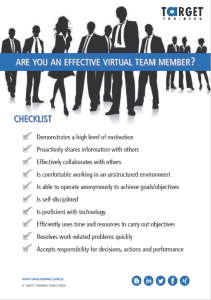
CHECKLIST – ARE YOU AN EFFECTIVE VIRTUAL TEAM MEMBER?

The 3 dimensions of customer service

Do you work directly or indirectly with customers?

If the answer is yes, then you provide customer service.

In a dedicated customer service environment, like a call centre or corporate helpdesk, customer satisfaction (CSAT) is a prominent phrase. In such an environment, customer satisfaction is measured through surveys and feedback. In a non-dedicated environment, customer service is only a small part of the job, but the principles are the same. You need and want the customer to be happy with the service you provide.
Writing emails that people read: Free eBook download hbspt.cta.load(455190, ‘aaa71860-e705-4a7e-b8e5-ab6e16849d2e’, {});

Your CSAT score – getting it from good to great

A happy customer = a returning customer. Because you are dealing with the expectations that people have of you, customer satisfaction means something else for each customer. There are many factors that can influence your customer’s satisfaction. But even though customer satisfaction means different things to different customers, all customer expectations fall in to what is called ‘The three dimensions of customer service.’

The 3 dimensions of customer service

The business dimension

The practical need of your customer. The business dimension is the reason why they are contacting you. Something’s not working. There’s an issue to solve or a question to answer. Providers who work too much in this dimension are focussing on solving the query and not enough on the person making the query. Customers feel the interaction was too impersonal or too technical and their CSAT score reflects this.

The human dimension

The human need of your customer. Customers want respect, attention, assurance. They want to feel important. Addressing customer needs in this dimension successfully has a larger overall impact on the long-term satisfaction of your customer than addressing their business need – even if you can’t answer their query immediately.

The hidden dimension

The hidden dimension is all the things that are going on behind the scenes for you and the customer. For the customer, it’s a set of expectations that they have of the service. For the provider, it’s the processes and procedures that must be followed during the interaction. Your ability to address customer expectations and the hidden aspects of your job can have a large impact on your CSAT score.

Achieve customer satisfaction by focussing on the human dimension

Although balancing your customer’s needs in each of the three dimensions is paramount in achieving an excellent CSAT score, it’s the human dimension where people feel they are cared about and listened to. The efforts that you make in the human dimension will pay off for you on their CSAT score.

A practical example

Here are two partial transcripts of identical queries that one of our clients (a corporate helpdesk) received. When the two surveys came back, one had an average score, the other received the highest mark possible. During both calls, the problem was solved within minutes.


Customer query:

I received an email that said I had to upgrade my software. When I clicked on the link, nothing happened. But now the program won’t start either.


Transcript 1

Customer: How am I supposed to work now?

Helpdesk: I’ll fix it for you. Just hang on for just a minute.

…(customer put on hold)…

Helpdesk: Okay. I’ve resent you the mail with a new link. It should work now. Call back otherwise.

Customer: Thank you.

Transcript 2

Customer: I don’t believe this. I have an important deadline.

Helpdesk: I need to put you on hold for a minute, while I check XYZ on our end. I’ll be right back.

…(customer put on hold)…

Helpdesk: Thanks for waiting. Within the next few minutes, you’ll receive an email with a new link. This time, the upgrade should work just fine. Do you want me to wait on the line while you try it?

Customer: No, that’s okay, I can call back if it doesn’t work.

Helpdesk:  I’m very sorry about this. I understand this is the last thing you need when you have a deadline. In any case, I hope it’s all sorted now.

Customer: Me too. Thanks.

What is good customer service, in your opinion?

Think about excellent customer service that you have received. What sticks in your mind the most – is it the time it took to solve the problem, or how the provider addressed your human need? What specifically did the provider say or do that made you a satisfied customer?  What does someone have to do for you to score a “perfect 10” on a feedback form? For some it is the effort the provider took to make sure the problem was solved. For others it’s the fact that it wasn’t a complete hassle to get someone on the line.

What is good customer service in your opinion? Let us know.

Teleconferences are not normal calls

Not your typical phone call

Teleconferences are a great way to connect to people around the world. They’re less expensive than face-to-face meetings, often take less time, and solve problems more efficiently than emails do. Conducting a teleconference should be easy. All you have to do is connect everyone on the phone and make decisions as if you were all in person, right? Unfortunately, it’s not that easy. A teleconference is not your average phone call. It is a meeting and needs to be prepared for as such. Below are some key points to help you remember that a teleconference isn’t your typical phone call.

3THINGS TO KEEP IN MIND FOR A TELECONFERENCE

Teleconferences aren’t difficult to carry out, but many people are not mentally prepared when joining. Having the awareness, through the 3 main points below, that your telecon is not just a normal call is a great start.

1. Plan

  • Send out an agenda beforehand with objectives, time(length) of call, participants, and specific results you want to achieve.
  • Identify roles: moderator, minute taker, etc. Remember, ideally the moderator and minute taker will be two separate people. Also, just because someone sent out the Outlook invitation, doesn’t mean they are automatically the moderator. Make it clear before the call.

2. Moderate

  • The moderator should ensure that the call starts on time, not too much time is spent on certain topics, and the call allows for everything to be covered within the designated time
  • The moderator should also open and close the call in an official way. Open: state the objectives and goals and introduce people if needed. Close: review the action items identified and what the next steps are.
  • The moderator should make an effort to include everyone on the call as best they can with pointed, open questions directed at specific people. This will encourage and facilitate participation.

3. Participate

  • Everyone should participate by being prepared to say something for each item. (You may not say something for each point, but you should be prepared to do so.)
  • Ask questions if you are not sure of something
  • Speak naturally in the direction of the microphone
  • Identify yourself when speaking (if necessary)
  • Pause occasionally so others may make comments
  • Try not to talk over others and interrupt by using polite phrases

More tips on teleconferences?

You might enjoy reading Chad Phillip’s post: Teleconference tips and phrases. The simple and practical checklists in our latest Ebook: The ultimate book of virtual teams checklists may also be of interest to you.

THE ULTIMATE BOOK OF VIRTUAL TEAMS CHECKLISTSVTchecklists

How effective is your virtual team?


Virtual Meeting Dos and Donts

Ensure your virtual meetings are productive

Virtual meetings can be tricky at times. Are they more like a telephone call or a face-to-face meeting? Well, they are a combination of both and should be treated differently. Here are some quick and easy “Dos” and “Donts” for virtual meetings.

New Call-to-action hbspt.cta.load(455190, ‘0455f399-a600-43a9-848f-986da3f8ea8e’, {});

Virtual Meeting “Dos”

  • Ensure all stakeholders essential to achieving the meeting’s goals can attend—Otherwise, reschedule it
  • Consider rotating the meeting time to accommodate those participants in different time zones
  • Prepare an agenda that outlines the meeting goals
  • Ensure meeting items/priorities/times align with meeting goals
  • Cancel a regularly scheduled meeting if you feel time could be better spent elsewhere
  • Send a meeting reminder with the agenda, needed materials, and information on the technology to be used at least three days before the meeting
  • Ask team members who are not speaking to put their phones on mute
  • Ensure everyone participates
  • Eliminate distractions—Ask people to turn off all smartphones, and to avoid email and instant messaging during the meeting
  • Side bar and report to make necessary side conversations part of the official function of the meeting
  • Document decisions and next steps


Virtual Meeting “Donts”

  • Hold a meeting if you can’t clearly answer the question “What is the purpose and expected outcome?”
  • Let meetings become “habit”
  • Attempt to cover more than five specific items per meeting
  • Allow side issues, “experts”, or native speakers to dominate the meeting
  • Hold a meeting even if any stakeholders essential to the meeting objectives cannot participate
  • Assume team members are clear about their roles and the meeting objectives
  • Continuously hold “marathon” meetings without any small-group brainstorming or breaks
  • Tackle critical topics at the start of the meeting
  • Let the meeting get off track by discussing the details of an action item that aren’t relevant to the meetings goals
  • Start late

More tips on virtual teams?

These dos and donts are only a small sample of the tips in our latest Ebook: The ultimate book of Virtual Teams checklists. Make sure you download a copy if you’re interested in maximizing your virtual team’s impact. Enjoy the read and… let us know what works for your virtual team!

Virtual Teams: Pre-Meeting To Do’s

What do you do before your virtual team meetings?

Preparing for any meeting is important, especially for virtual meetings via teleconference or netmeetings.  It is difficult working in virtual teams as you don’t see your other team members face-to-face very often.  So, try not to put yourself at a further disadvantage by forgetting to do a few small things before your meetings.  Here are five easy things you can do before your virtual team meetings to help make them more productive.

5 Pre-Meeting To Do’s for Virtual Teams

1.  Identify Team Members

List the decision makers, subject experts and opinion leaders before the meeting and identify their possible input and interests in the outcome of the meeting.

Consequences:

  • Knowing who to address when
  • Knowing who can answer specific technical questions
  • Focus information on decision maker’s interests

2.  Establish Ground Rules

The team decides on acceptable meeting behavior before the meeting begins and holds each other accountable to the rules; for example no interrupting, poll opinions, always have an agenda, etc…

Consequences:

  • Promoting behaviors that will improve group interaction
  • No single “enforcer” necessary
  • Accountability through reminding

3.  Publish an Agenda and Goals

Publishing an agenda should be a “must do” but it doesn’t always happen or it doesn’t happen in time for the participants to prepare. Another important feature of an agenda is a purpose statement or goal. What do you want to achieve with the meeting? What does a good meeting look like? Answering these questions will help you and your participants feel like you’ve accomplished something when the meeting is over.

Consequences:

  • Clear direction for the meeting
  • Improve preparation of participants
  • Way to keep participants focused and on topic
  • Feel a sense of accomplishment when it’s over

4.  Build Relationships

Take time before the meeting to get to know team members personally. It’s really important to build rapport and commitment to the Virtual Team.

Consequences:

  • Learning what others are interested in beyond the work of the meeting
  • More information to assist understanding
  • Help design metaphors and stories to illustrate key points
  • Increase commitment to virtual team

5.  Master the technology you will use in the meeting

Understanding your technological tools, what can go wrong and knowing how to fix it in advance of the meeting is crucial. Know what tools are available to your participants and be prepared to trouble shoot with participants. Always have a back-up plan.

Consequences:

  • Head off technical problems before they happen
  • Save time addressing technical problems during the meeting
  • Have input options for participants

You can ensure your virtual team meetings run more smoothly by taking a few minutes and doing the five things above.  What else have you done that has worked well?  Let us know in the comments area below.  Also, if you want to improve your overall participation in virtual teams, you can download our eBook of checklists and check out our seminar on Working Effectively in Virtual Teams by clicking here.

Challenges of Working in Virtual Teams

What are the challenges in your virtual team?

Each virtual team has their own unique challenges, but there are always a few that seem to be consistently present.  In this short video, Scott Levey, Director of Operations, focuses on two of the most commons challenges we see when training virtual teams.  Having awareness of these, and other issues that may arise, will help your virtual team increase its effectiveness.


Want to improve your virtual team’s performance?  Make sure to download our eBook of Virtual Team Checklists and check out our Working Effectively in Virtual Teams seminar.

Giving Feedback Virtually

Do you ever give feedback virtually?

Do you give your suppliers, your clients and your co-workers effective feedback – both positive and constructive (negative)? Giving good, timely, constructive and actionable feedback is something that most of us have to put a lot of effort into. Do we praise theVTchecklists right things? When we give constructive feedback, do we make positive suggestions? Do we always remember to address the issue, not the person?

Giving feedback well is not easy. But, giving feedback well in a business world that is becoming increasingly virtual can be a real challenge. When we add a few of the complexities that come from interacting virtually, we have an even harder job. Some of these challenges include timing, reading reactions, specificity and tone. When giving feedback virtually, for example via email, here are a few suggestions and tips below to help you do a better job.

Free eBook
download

5 Tips for giving feedback virtually

1.  Make sure that the timing is appropriate – especially if your feedback is negative. Think about raising a child or a pet; you don’t tell them they did something wrong three days later!

2.  Make sure that the reader understands immediately what the email is about:

  • Use a subject line like: “Feedback on your proposal”
  • Tell them in the first sentence why you are emailing: “I’m writing to you with some feedback regarding the proposal you sent me on January 4.”
  • Tell them what feedback is included: “I have some feedback regarding the pricing and the payment process.”

3.  Break your feedback up. If you told them you had feedback about the pricing and the payment process, these should be two completely separate paragraphs. Give them headings if you wish.

4.  Try to be specific and give justification. For example:

  • “We liked your proposal. Especially the second page where you mentioned that the training would focus on our corporate values. This really fits to our company philosophy.”
  • “Unfortunately, we cannot agree to point 3 in section 2, relating to the payment options. This is not in accordance with our compliance policy.”

5.  When rejecting a suggestion, try to make a counter suggestion. For example:

  • “We cannot agree to point 3 in section 2. However, we could agree if the payment period was extended to 60 days.”
  • “I do not like the way you formatted the report. Next time, try to base it on the attached example or come and see me to discuss my expectations in more detail.”

Of course, there are many other things which can help to make giving feedback virtually more effective. Please feel free to add your extra ideas in the comments section below. Also, make sure to check out our seminar on Working Effectively in Virtual Teams to help improve your virtual team’s performance.